A finding you cannot show your working for is an anecdote. This guide covers why OSINT analysts keep a research log, what to record, and how to capture, archive and hash what you find, with a fictional log extract.

Photo: Yen Vu / Unsplash
Evidence capture means recording what you found, where, when and how, as you find it: a log, a saved copy of the page, and enough detail for someone else to repeat your steps. One line per finding is enough.
The Association of Chief Police Officers (ACPO) Good Practice Guide for Digital Evidence (2011), written for law enforcement, says every process applied to digital evidence should leave an audit trail (a record of each step taken), and an independent examiner following it should “achieve the same result”. The same logic holds for due diligence, HR investigations and security reviews.
10:12 BST, never 10:12.Bing | "Harrowgate Freight" "data breach" | 0 results. Nil results are the ones people forget, and the ones they get asked about later.Screenshot 2026-09-22 at 10-11-40 Careers - Harrowgate Freight.png (fictional).screenshot and choose the full-size option. Chrome documents the option under More options in Device Mode. Wording varies between versions.https://web.archive.org/web/20260922091230/https://harrowgate-freight.example/careers (fictional). A page archived at 10:12 BST therefore carries 09:12 in its link. Log it in full.Get-FileHash .\HGF-002_2026-09-22_1011BST_careers.png -Algorithm SHA256 (SHA-256 is the default).certutil -hashfile HGF-002_2026-09-22_1011BST_careers.png SHA256.shasum -a 256 HGF-002_2026-09-22_1011BST_careers.png (without -a 256 it uses SHA-1).HGF-002_2026-09-22_1011BST_careers.png. No colons; Windows forbids them.…_careers_annotated.png). Hash the original, never the copy.Harrowgate Freight Ltd, a fictional client, asked what its website gives away. Three lines from the log:
| Ref | Date/time | Action | URL | Finding | Capture | Archive / SHA-256 |
|---|---|---|---|---|---|---|
| HGF-001 | 2026-09-22 10:04 BST | Google: site:harrowgate-freight.example filetype:pdf | Results page | 3 PDFs indexed | HGF-001_2026-09-22_1004BST_results.png | Not archived. 9c1e…07a4 |
| HGF-002 | 2026-09-22 10:11 BST | Opened careers page | https://harrowgate-freight.example/careers | Job advert names depot software “FleetDesk” and version | HGF-002_2026-09-22_1011BST_careers.png | web.archive.org/web/20260922091230/… 4b7d…e21c |
| HGF-003 | 2026-09-22 10:26 BST | Opened PDF from HGF-001 | …/downloads/driver-handbook.pdf | Page 14 lists staff names and mobiles. Stopped, not saved. Client told | None | Not archived. Personal data |
All data is fictional; hashes shortened.
HGF-003 is the line beginners leave out. Deciding not to capture something, and recording why, is part of the record.
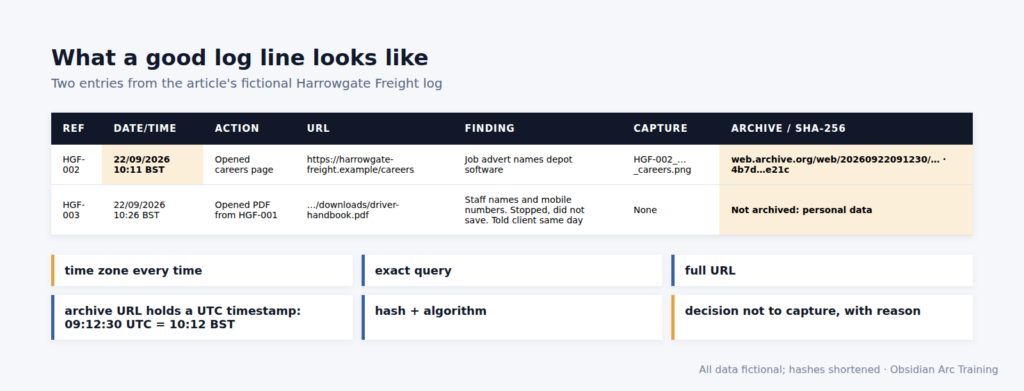
Figure: OAT teaching graphic. Fictional data.
The OAT view Anyone can learn to find things online in an afternoon. What makes it professional is a record someone else can retrace. If an analyst’s notes would not survive a colleague’s review, we would not let them near a live case.
Print the top tips sheet and open a log before your next search.
The Computer Misuse Act 1990 makes it an offence to cause a computer to perform a function intending to secure access you know is unauthorised; using someone else’s login or getting round access controls risks exactly that. UK GDPR and the Data Protection Act 2018 still apply to public data: have a purpose, be proportionate, record your reasons.
OSINT is easy to start and hard to do properly. We teach the hard part. Recording and reporting run through the whole course. Find out about our Level 3 Award in OSINT at obsidianarctraining.com.

