Reverse image search basics: why one engine is never enough
A photo turns up captioned “happening now”. Reverse image search is how you find out whether it is new, old or borrowed. We cover what the main free engines do in 2026, and how to walk a fictional “breaking news” photo back to the earliest copy you can find.
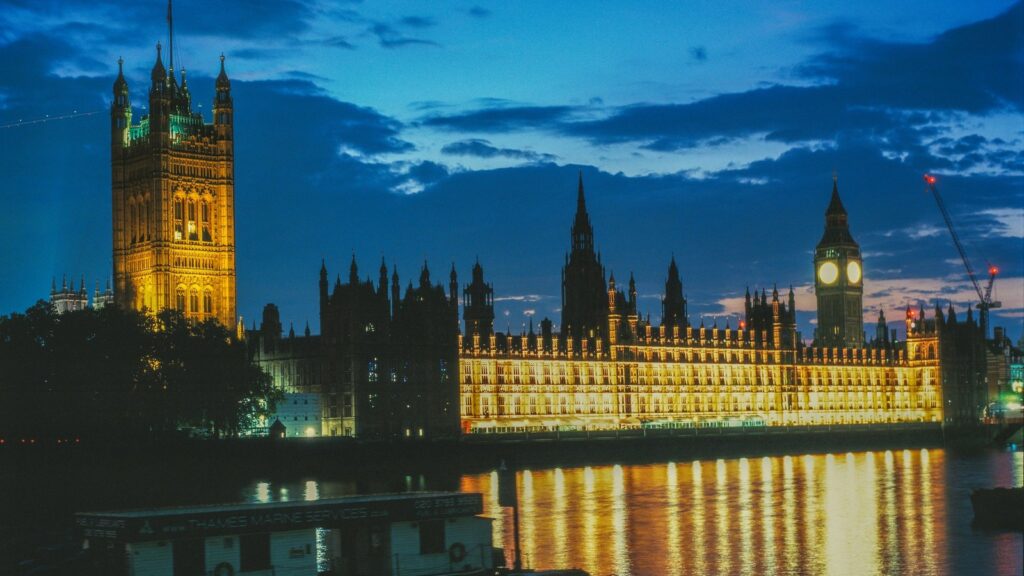
Photo: Intrepid / Unsplash
What it is
A normal search starts with words; a reverse image search starts with a picture. You give the engine a file or a web address and it looks for copies, edited versions and pages using it.
Each engine builds its own index (its catalogue of web pictures) by crawling (automatically visiting and recording) web pages, so each sees a different slice of it. One photo might return 40 pages on one engine and none on another; neither is wrong.
Why it matters for an OSINT analyst
OSINT (open-source intelligence) is often about checking a claim. In emergencies, old footage gets reshared as new. Full Fact has shown that clips captioned as floods in Nepal and Libya had been online before the events they supposedly showed. Reverse image search answers the first question: has this picture been online before?
How to do it
One fictional photo runs through every step: Elizabeth Tower (Big Ben) with floodwater on the embankment, posted as “Westminster flooding RIGHT NOW”.
Save a clean copy. Keep the largest version, its URL, the poster and when you found it: 2026-09-23 09:14 | flood-tower.jpg | @harrowgate_updates (fictional).
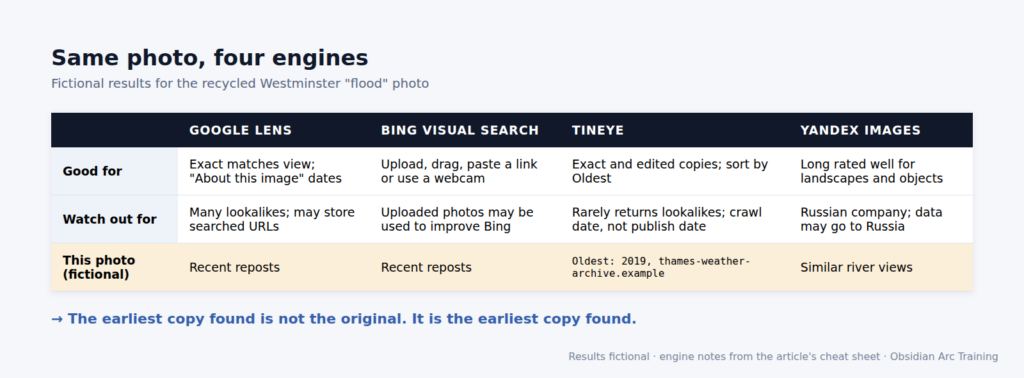
Google Lens. On google.com, click the search-by-image icon, then upload, drag in or paste a link. Switch from lookalikes to the view of exact copies (labelled “Exact matches” at the time of writing). Here, 200 lookalikes become three republishing sites carrying the exact picture.
Check “About this image”. Google estimates when it may first have seen the picture or a similar version; the feature is available only in some regions. Here it says about seven years ago.
Bing Visual Search. On Bing Images, click the camera icon, then drag in, upload or paste a picture or URL. Here Bing finds a stock page labelling the image “digitally edited”.
TinEye. On tineye.com, add the image by file, drag-and-drop, clipboard or web address. TinEye hunts for the picture itself, edits included, not lookalikes. Sort by oldest. The flood photo turns up on thames-weather-archive.example, crawled 14 March 2019.
Yandex Images. On yandex.com/images, use the search-by-image option. Analysts have long rated it highly for landscapes and objects, and here it adds a 2021 travel blog.
Crop and repeat. Crop to the interesting part and search again; blurring or pixelating clutter and people steers the engine to the background. Cropping to the flood-defence sign swaps tower lookalikes for pages about that stretch of river.
Compare the dates. Record each engine’s earliest date and source:
Engine
Earliest copy
Where
Google Lens
“about 7 years ago”
About this image
TinEye
crawled 14 March 2019
thames-weather-archive.example
Bing
no date shown
stock page, “digitally edited”
Yandex
2021
travel blog
So the photo is from 2019 or earlier and has been edited. No single engine found all four leads. (All results are fictional.)
Figure: OAT teaching graphic. Fictional data.
The OAT view
Anyone can paste a picture into a search box. The skill is knowing what the results prove, what they do not, and recording it so others can check. No working shown, no place in a live case.
Common mistakes
Using one engine and trusting the first match. An empty results page means that engine has no match; copies may exist elsewhere. Bing found nothing dated, and the photo was still seven years old. The top result is the most similar, not the oldest.
Misreading dates. TinEye’s oldest date records when its crawler got there, not when the picture first appeared. “Crawled 14 March 2019” means “online by then”, nothing more.
Uploading sensitive images. Your upload goes to a third party. TinEye says it does not save search images or add them to its index. Microsoft says your photos may be used to improve Bing’s image processing, and Google says it may store URLs you search with. Yandex is run by a Russian company whose privacy policy says information may be transferred to and processed in Russia. Your own organisation’s website photos are fine; a client’s incident photo is not, without authority.
Believing the machine. Chatbots now “geolocate” photos. GeoContext, a September 2026 preprint (not peer-reviewed), tested five vision-language models (AI models that read images as well as text) and found they struggled to reject false location claims for nearby decoy sites: 83.8% of wrong “yes” answers came with confidence of at least 0.8. A confident “yes, that is Westminster” is a lead, not a finding.
Face searching. Face-search sites are out of scope. Under UK GDPR, biometric data is special category data when processed to uniquely identify someone; an ordinary photo is not automatically biometric. In 2025 the Upper Tribunal ruled that UK GDPR can apply to Clearview AI, an overseas facial-recognition firm; Clearview has permission to appeal and the case was continuing at the time of writing.
The legal bit
A photo of a recognisable person is usually their personal data. Under UK GDPR and the Data Protection Act 2018, have a clear purpose and collect only what you need. Checking whether a flood photo is old is a clear purpose; collecting pictures of the poster is not. Never log in to someone else’s account; unauthorised access can be an offence under the Computer Misuse Act 1990.
Next steps
To practise, pick a photo from Wikimedia Commons’ “Elizabeth Tower” category and run it through all four engines, noting which find the Commons page and with what dates. Then repeat with a photo you took this morning: lookalikes and no exact copies is what “never seen online” looks like.
Every engine has its own index. Use at least two, ideally four.
Crop to the interesting detail and search again.
Sort TinEye by oldest, but read any date as “seen no later than”, not “created on”.
Think before you upload: your image goes to a third party.
Use reverse image search to verify claims, not to identify people. AI answers are leads, not findings.
Want to go further?
OSINT is easy to start and hard to do properly. We teach the hard part. Image verification is part of it, taught the way we describe here: several engines, dated, logged. Find out about our Level 3 Award in OSINT at obsidianarctraining.com.
Intelligence grading compared: 5x5x5, 3x5x2, Admiralty, PHIA Every mature intelligence organisation has a scheme for saying how much it trusts a source, how much it believes a piece of information,…
Read Article
OSINT Research
Show your working: notes and evidence capture in OSINT
Reading Time: 4mins
Show your working: notes and evidence capture in OSINT A finding you cannot show your working for is an anecdote. This guide covers why OSINT analysts keep a research log,…
Read Article
OSINT Research
Is this source any good? Five checks for OSINT beginners
Reading Time: 5mins
Is this source any good? Five checks for OSINT beginners Finding information is the easy bit. Deciding whether to believe it is where beginners come unstuck. A five-question checklist, how…
Read Article
OSINT Research
Search operators 101: the handful every OSINT beginner needs
Reading Time: 5mins
Search operators 101: the handful every OSINT beginner needs Search operators are short commands that tell a search engine exactly what you want. Six of them do most of a…
Read Article
OSINT Research
Boolean searching for OSINT: turn a question into a query
Reading Time: 4mins
Boolean searching for OSINT: turn a question into a query Boolean search tells a search engine which words must appear, which are alternatives and which to leave out. Each platform…