Boolean search tells a search engine which words must appear, which are alternatives and which to leave out. Each platform speaks its own dialect, so a query that works on Bing can fail on Google or X.

Photo: Daniel Forsman / Unsplash
There are five building blocks, known as operators, illustrated here with Harrowgate Freight Ltd, a fictional haulier.
Harrowgate AND tender.contract OR tender.Harrowgate -jobs drops careers pages."Harrowgate Freight".Harrowgate (contract OR tender).Bing documents all five, evaluating brackets first and OR last, so unbracketed Harrowgate contract OR tender reads as “Harrowgate and contract, or tender on its own”.
OSINT (open-source intelligence) starts with a question; Boolean turns it into a query, something a search engine can act on.
OR between alternatives and a minus, not NOT, before unwanted words. It shows OR in capitals; vendor guides say lower-case or is an ordinary word. The pipe (|) and brackets are reported to work, but Google documents neither, nor the capitals rule, and a July 2026 test could not tell whether OR changed results much.AND or &, OR or |, NOT or minus, quotes and brackets. Lower-case or and not are discarded as stop words, and only the first ten terms are used.contract OR tender in the search box, the exclude field becomes -jobs, and the phrase field adds quotes. X’s developer documentation says a space means AND, OR gives alternatives, a minus excludes and brackets group; operators are not case-sensitive. That covers the API (what programs use), not the site; investigators’ guides report the same typed operators work on x.com. Test first.("Harrowgate Freight" OR "Harrowgate Logistics") and (contract OR tender).AND on Bing; on Google and X a space does the job.-jobs."Harrowgate Freight" first, then add (contract OR tender), then -jobs.Google: ("Harrowgate Freight" OR "Harrowgate Logistics") (contract OR tender) -jobs
Bing: ("Harrowgate Freight" OR "Harrowgate Logistics") AND (contract OR tender) NOT jobs
X: ("Harrowgate Freight" OR "Harrowgate Logistics") (contract OR tender) -jobs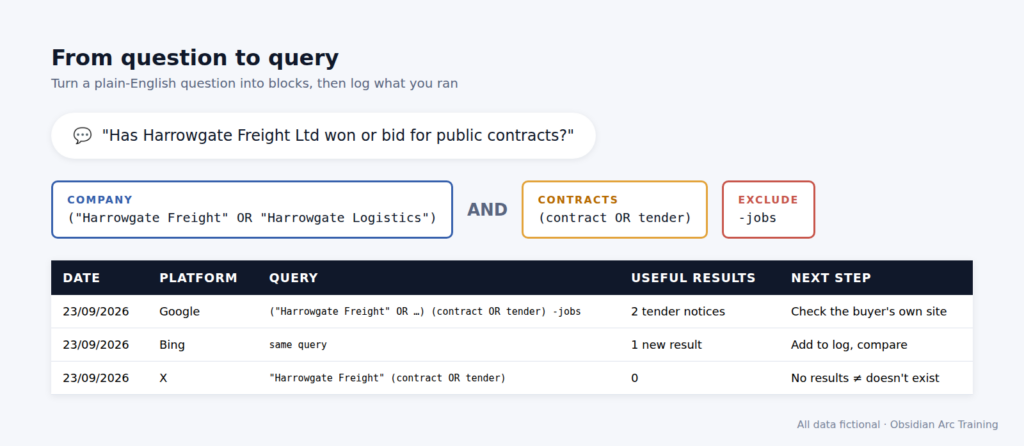
Figure: OAT teaching graphic. Fictional data.
Harrowgate Freight Ltd (harrowgate-freight.example) wants to know what outsiders could learn about its supply chain. The company and every result below are invented. Its security lead begins with "Harrowgate Freight" and gets a page of job adverts. Adding (contract OR tender) and -jobs leaves two trade-press stories and a tender notice; on X the same query finds staff posts about a new depot contract. Her log records what each query found, and where.
The OAT view
A logged query is a record of what you asked, and so of what you didn’t. We would take a plain query anyone can rerun over a clever one nobody can reproduce.
-jobs; if the careers page survives, the minus failed."Harrowgate Freight Limited" can return nothing while "Harrowgate Freight Ltd" finds the notice. Google does not promise to index every page (add it to the catalogue it searches), and even site: can leave indexed pages out.Purpose matters on public pages too. If your searches pull in personal data, UK GDPR and the Data Protection Act 2018 will usually apply, including purpose limitation and data minimisation: if the question is about the company, record the contract, not the contracts manager’s name. If a result leads to material clearly not meant to be public, stop and tell the owner: knowingly unauthorised access to computer material is an offence under section 1 of the Computer Misuse Act 1990.
Print the companion top-tips sheet, then run the three queries above with your own organisation’s name in place of Harrowgate’s. Keep the log.
OSINT is easy to start and hard to do properly. We teach the hard part. Query design is where the course starts, and where most self-taught analysts have gaps. Find out about our Level 3 Award in OSINT at obsidianarctraining.com.

