Search operators are short commands that tell a search engine exactly what you want. Six of them do most of a beginner’s work, and Google documents all six. We show each one in use and flag the operators old cheat sheets still promise, then walk through finding a public organisation’s annual reviews.

Photo: Hanna Pad / Pexels
An operator is a short command typed into the search box alongside your words. Compare two searches. annual review brings back everything on the topic; site:ncsc.gov.uk "annual review" brings back only pages on one site that use that exact phrase.
Google’s help page documents six: quotation marks, site:, the minus sign, filetype:, before: and after:. Bing has equivalents for most.
OSINT (open-source intelligence) is information gathered from public sources and turned into something useful.
Operators save time. The bigger benefit is repeatability. A precise query can be written down, rerun next month and checked by a colleague. “I Googled it” cannot. Search engines also tailor results to your location, history and settings, so a written query is part of showing your working.
Try these in Google or Bing, swapping in your own terms, one operator at a time.
"annual review". Without them, a page about an annual staff review would qualify.site:ncsc.gov.uk "annual review" returns only pages on that site. It covers subdomains too, so site:gov.uk includes ncsc.gov.uk.NCSC "annual review" -consultation. -site:gchq.gov.uk is widely used to drop a whole site, though Google documents the minus only before words, so check the results. Bing also accepts NOT in capitals: "annual review" NCSC NOT consultation.filetype:pdf, or the same with docx, xlsx or csv. site:harrowgate-freight.example filetype:pdf shows every PDF the engine has indexed (added to its catalogue) on the domain of Harrowgate Freight Ltd, a fictional haulier we use throughout this series.NCSC "annual review" after:2024-01-01, or before:2025/11/01, or both for a range: after:2024-01-01 before:2025-12-31. Google says these work on the “last updated” date, which is not always the date you care about, so treat them as a rough filter. Bing documents no date operator.&udm=14, and you can set it as a browser’s custom search engine: https://www.google.com/search?q=%s&udm=14. Google has not documented the parameter, an August 2026 check found it sometimes stripped, and it could go without notice.intitle:, inurl: and intext: appear on many cheat sheets but not on Google’s current help pages. A July 2026 test found intitle: and intext: filtering properly but inurl: applied loosely: only five of nine inurl: results had the term in their address. Treat all three as undocumented and check results by eye. Bing documents intitle: and inbody:, but not inurl:.
And cache: is gone. Google confirmed in September 2024 that it no longer works, and it returned nothing in the July 2026 test. If a guide still lists it, be wary of the rest.
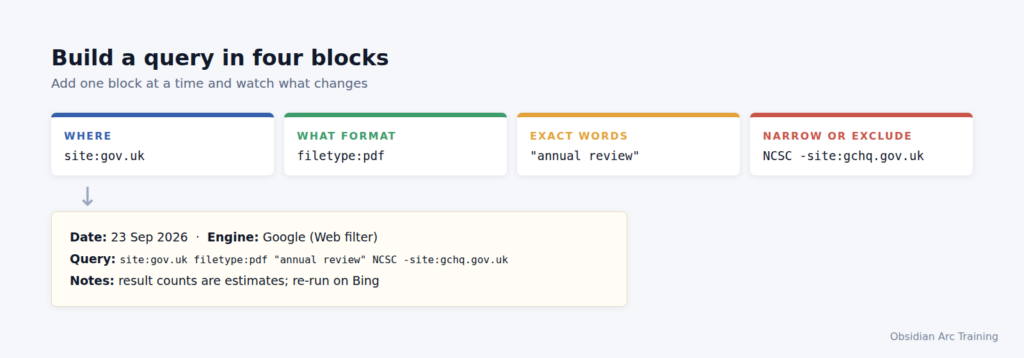
Figure: OAT teaching graphic. Fictional data.
The National Cyber Security Centre (NCSC) publishes an annual review. The 2025 edition came out on 14 October 2025, covering 1 September 2024 to 31 August 2025. You want every edition as a PDF.
Start broad:
site:gov.uk filetype:pdf "annual review" NCSC
Expect near-duplicates: GCHQ’s site carries a news article about the review with its own printable PDF. For a clean list, narrow to the NCSC’s site:
site:ncsc.gov.uk filetype:pdf "annual review"
For recent editions on Google, add after:2024-01-01, then rerun in Bing without the date and compare. Record both queries, the engines, the date and what each returned.
The OAT view
Any cheat sheet lists the operators. The professional skill is knowing which ones still hold today and showing exactly what you ran. If a colleague cannot rerun your search, we would not put the result in a report.
site: can leave indexed pages out. That figure is not the size of a site, and a thin result is not proof of absence.cache: was retired, and a July 2026 test found only 12 of 41 commonly listed operators still worked.OR and NOT typed in lower case.Searching public pages is not the risk. If a result leads to a file that was clearly not meant to be public, stop, do not download it and tell the owner; accessing material you know you are not authorised to see can fall under section 1 of the Computer Misuse Act 1990. If site:harrowgate-freight.example filetype:xlsx turned up a spreadsheet called “driver payroll 2026” (fictional), you would close the tab and email the company, not open the file. If your research touches personal data, UK GDPR and the Data Protection Act 2018 apply, and you should collect only what your purpose needs. Checking what a company publishes about itself is one thing. Compiling its drivers’ home addresses is another.
Print the companion top-tips sheet. Practise on a public organisation you know well, logging every query in the form 23 Sep 2026 · Google, Web filter · site:ncsc.gov.uk filetype:pdf "annual review".
site:, minus, filetype:, before: and after:.intitle:, inurl: and intext: are undocumented by Google, and one July 2026 test found inurl: applied loosely. cache: no longer works.udm=14) for plain links, but do not assume the parameter is permanent.site: is incomplete. Run the query on Bing too.OSINT is easy to start and hard to do properly. We teach the hard part. Search technique and logging run through the whole course, so your searches stand up when someone checks them. Find out about our Level 3 Award in OSINT at obsidianarctraining.com.

